|
Topo Maps - USGS Topographic Maps on Google Earth.
|
|
Click for larger image.
|
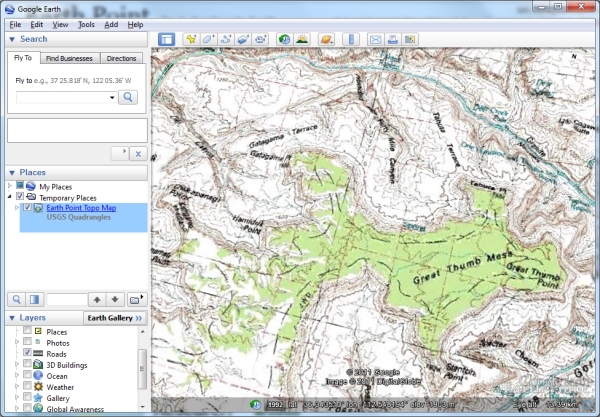
Displays USGS Topo Maps on Google Earth. For USA only.
In the western states, the USGS topo map includes township and range markings, which
can be helpful when trying to sort out questions in the BLM data.
Hint
Once the topo map is downloaded to Google Earth, its transparency can be adjusted
to let the satellite imagery show through.
- On the left side of the Google Earth screen are several windows. These are "Search",
"Places", and "Layers". If you do not see these widows, then on the Google Earth
menu, select "View", "Sidebar".
- The "Places" window is a folders view of the files that are loaded into Google Earth.
- In the "Places" window, find the folder called "Earth Point Topo Map". Unless you
have moved it, the folder is at the bottom of the "Places" window.
- Select the folder. One way is to left-click on the folder. A description box titled
"USGS Quadrangles" pops up. Close it by hitting the "Esc" key on your key board,
or by clicking anywhere on the Google Earth map. The folder is now selected.
- At the very bottom of the "Places" window, just above the "Layers" window, are two icons. The left icon
activates "search". The right icon activates the slider bar. Click the slider bar icon.
- Slide the bar to the left to make the topo map more transparent, to the right to
make it more opaque.
Information: Topo Maps
 Map images hosted by ESRI
This map presents land cover and detailed topographic maps for the United States. The map includes the
National Park Service (NPS) Natural Earth physical map at 1.24km per pixel for the world at small scales,
i-cubed eTOPO 1:250,000-scale maps for the contiguous United States at medium scales, and National
Geographic TOPO! 1:100,000 and 1:24,000-scale maps (1:250,000 and 1:63,000 in Alaska) for the United
States at large scales. The TOPO! maps are seamless, scanned images of United States Geological Survey
(USGS) paper topographic maps.
 Map data provided by United
States Geological Survey
|